Next-bid prediction. Your strategy.

Anticipate the next bid.
Make your next move.

See an estimate of the next bid. Explore conservative, balanced and aggressive strategies. Keep your personal limit in view as the auction moves.

For Bring a Trailer buyers · Desktop Chrome · You stay in control

ANTICIPATE → CHOOSE → STAY IN CONTROLActual BidBud UI · Release preview
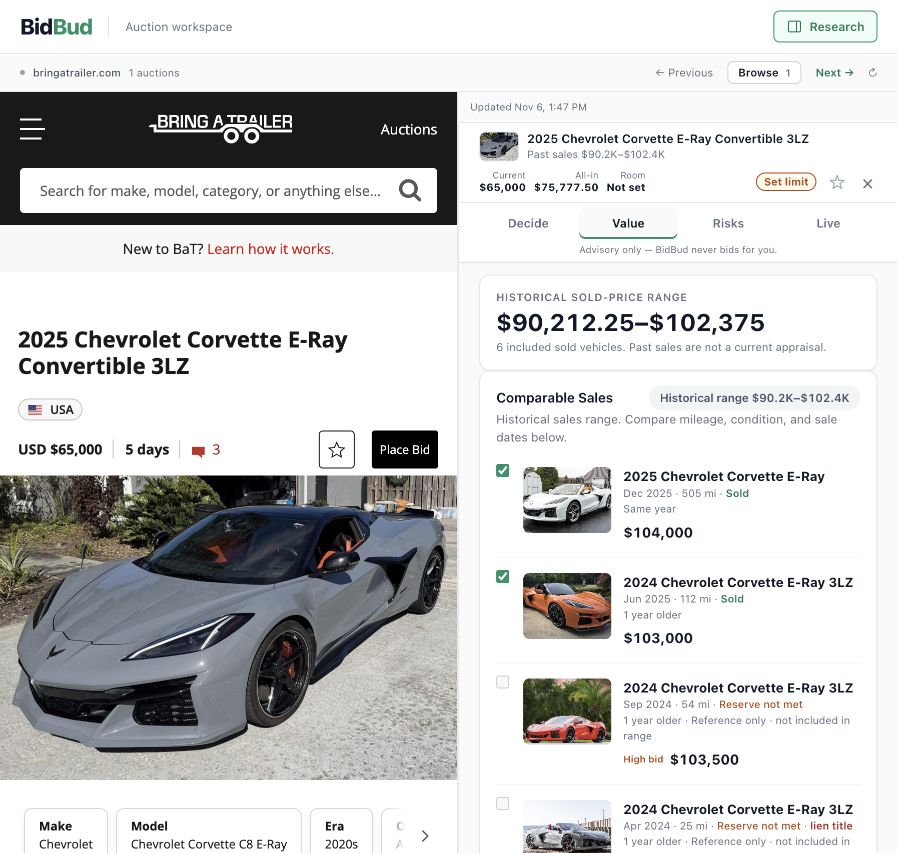
BidBud development interface showing an estimated next bid and adjustable strategies. Illustrative auction and model inputs.

Actual development UI · Illustrative auction and model responses.
Unpublished preview; the Chrome Store interface may differ.

Next-bid estimatesNo automated biddingYour decision, always

A plan for the next bid

Anticipate. Choose.
Stay within your limit.

The next bid is an estimate. Your strategy is a choice. Your limit stays yours.

01 / ANTICIPATE

See what may come next.

Follow the current bid and BidBud’s estimated next bid, beside the auction. Guidance refreshes as new bids arrive, giving your next decision a starting point.

02 / CHOOSE A STRATEGY

Adjust your approach.

Compare conservative, balanced and aggressive suggestions. See how the suggested amount changes when you choose a different approach.

03 / STAY WITHIN YOUR LIMIT

Know when to stop.

Review the estimated all-in cost, set your maximum hammer bid and lock your limit. Suggestions respect that ceiling. Every actual bid remains your decision.

Your next move. In 18 seconds.

From the next bid to your next move.

Silent film · Actual development interface · Illustrative auction and model responses, not a live forecast. Unpublished preview.

Read the film or explore at your own pace

Anticipate: see the current bid and an estimated next bid. Choose: switch between conservative, balanced and aggressive suggestions. Stay within your limit: review costs and lock your maximum hammer bid. The forecast describes the next bid, not the final sale price or your chance of winning. This demonstration uses illustrative inputs in the actual development interface.

Choose the approach that fits you

Same auction.
Three ways to approach it.

Switch strategies below to see the suggested bid change. Conservative uses a smaller step; balanced stays close to the estimated next bid; aggressive explores a larger step. Your maximum still applies.

Actual development UI with illustrative auction and model inputs. These controls explore recorded screens; they do not place bids. No strategy guarantees a win.

Actual BidBud development interface showing the conservative strategy with illustrative auction and model inputs.Actual BidBud development interface showing the balanced strategy with illustrative auction and model inputs.Actual BidBud development interface showing the aggressive strategy with illustrative auction and model inputs.

Conservative — a smaller step above the current bid.

Open the full-size product capture ↗

Unpublished development preview · Illustrative amounts · Store interface may differ.

Your ceiling, through every strategy

A stronger strategy
starts with a limit.

The hammer price is only part of what you pay. Bring buyer fees, tax, shipping and repair assumptions into view before choosing your ceiling.

Lock your limit to make a later increase a deliberate choice. Switching strategy keeps that limit in place.

Compare the strategies ↑
Actual BidBud interface showing a locked personal limit and estimated costs in a historical practice sample.

Actual development UI · Historical practice sample · Illustrative costs

FREE TOOL · NO SIGN-UPUSD

What will this bid really cost?

Add tax, shipping & other costs

Choose the fee shown in the auction’s bid box. Enter your applicable tax rate and taxable base. A zero allowance excludes that cost.

Example · before tax & added costs $42,000.00

$40,000 hammer + $2,000 buyer fee.

Try BidBud free in Chrome

Calculator works on any device. Extension requires desktop Chrome. Your inputs stay in this browser.

Assumptions & fee source

Estimates use only the amounts you enter; this is not a vehicle valuation or a tax determination. A maximum bid is a personal budget ceiling and may not match an auction’s required bid increment. Confirm every cost before bidding.

USD fee schedules checked October 9, 2026 against Bring a Trailer’s rules. The 5% and 10% categories have different caps; the auction’s bid box controls. Fees can change.

Actual BidBud development UI stating Not enough matching sales and withholding a market estimate.

Actual development UI · Historical sample
View the evidence screen full size ↗

Evidence before confidence

A useful answer.
Even when it's
“not enough data.”

Historical sales can add context, but two cars are rarely identical. Review the dates and differences. When the evidence is too thin, a missing estimate is more useful than false certainty.

BidBud supports your research. It doesn't replace an inspection, guarantee a price or make the decision for you.

Our vision / The future of auctions

Great auctions deserve
better-informed decisions.

We see a future where useful intelligence is part of the auction experience itself. Where next-bid estimates, adjustable strategies and a buyer’s limits come together at the moment they matter.

For buyers

A clearer path from discovery to due diligence, with the context to participate thoughtfully and the confidence to stop.

For sellers

A buying experience where vehicle history, meaningful differences and unanswered questions can be understood in context.

For auction platforms

An opportunity to explore intelligence within the listing and bidding workflow, designed around the people using it.

Explore a platform pilot

Today, BidBud focuses on Bring a Trailer in desktop Chrome. Additional platforms and embedded integrations are future direction, not announced partnerships. BidBud is independent of auction platforms.

Before you get started

Good questions.
Clear answers.

Where can I use BidBud?

BidBud's Chrome extension supports Bring a Trailer vehicle listings on desktop Chrome. On your phone, explore the product walkthrough above, then visit this page from desktop Chrome to view the Store listing.

What does next-bid prediction mean?

It estimates the next bid amount from observed bidding. It is not a market valuation, final sale price or probability of winning. Estimates can be wrong or unavailable.

What changes when I switch strategy?

The suggested step changes. Conservative, balanced and aggressive approaches let you compare amounts within your saved limit. You choose whether to act and confirm the platform’s required increment.

Does BidBud place bids for me?

No. BidBud is advisory software. It does not place, cancel or automate bids. You decide whether to participate and what to bid on the auction platform.

Are these live prices or guaranteed valuations?

No. Historical sales provide context, not a guaranteed value. Availability and relevance vary by vehicle. Cost estimates depend on fees and assumptions you should verify for your purchase.

Is the walkthrough the current Store version?

The walkthrough shows the unpublished development interface with clearly labeled illustrative auction data and model responses. It previews the workflow, not prediction accuracy. The Chrome Store interface may differ.

Where can I check pricing and privacy?

Check the Chrome Web Store listing for the current release and its disclosures. Any future paid offer should show its price, renewal terms and limits before checkout. Read our Privacy Policy for how BidBud handles information.

The next bid is your decision

Your next auction.
Your next move.

Install from desktop Chrome. Research thoughtfully. Bid on your terms.